EASYNEONSIGNS / OWNER’S GUIDE
Your sign.
Set up right.
From the box to your wall. Find the right mounting method, connect your sign and get to know your remote.
Let’s get started Already set up? Get troubleshooting help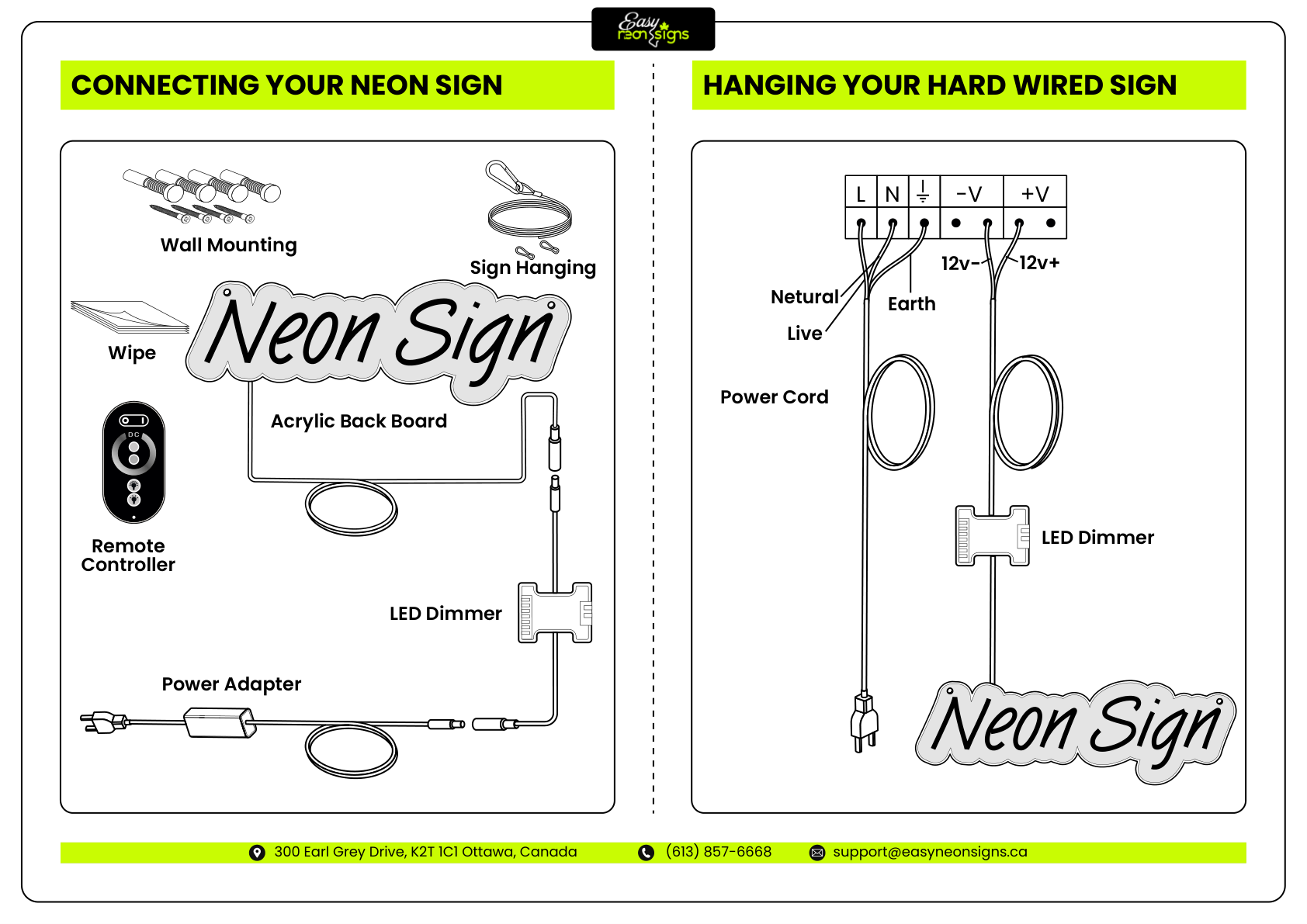
01 / THE FIRST THINGS
Before you begin.
Unpack on a clean, flat surface. Keep the protective packaging nearby while you check the sign and its accessories.
Check what came with your order
- Your sign and acrylic backing
- The matching power supply and cable
- A dimmer / controller and remote, if ordered
- The mounting hardware supplied for your order
Support the backing
Lift the sign by its acrylic backing. Do not pull on the LED tubing or use the power cable to carry or hang it.
Match the location
Check your order’s indoor or outdoor specification. Keep indoor-only equipment dry and do not assume the power supply or controller is weatherproof.
Check the surface
Use fixings rated for your wall or ceiling and the sign’s weight. If you are unsure about the surface or hardware, ask an installer.
02 / MAKE IT FEEL AT HOME
Mount your sign.
Choose the method that matches the hardware in your order. Plan the cable route and outlet position before marking any holes.
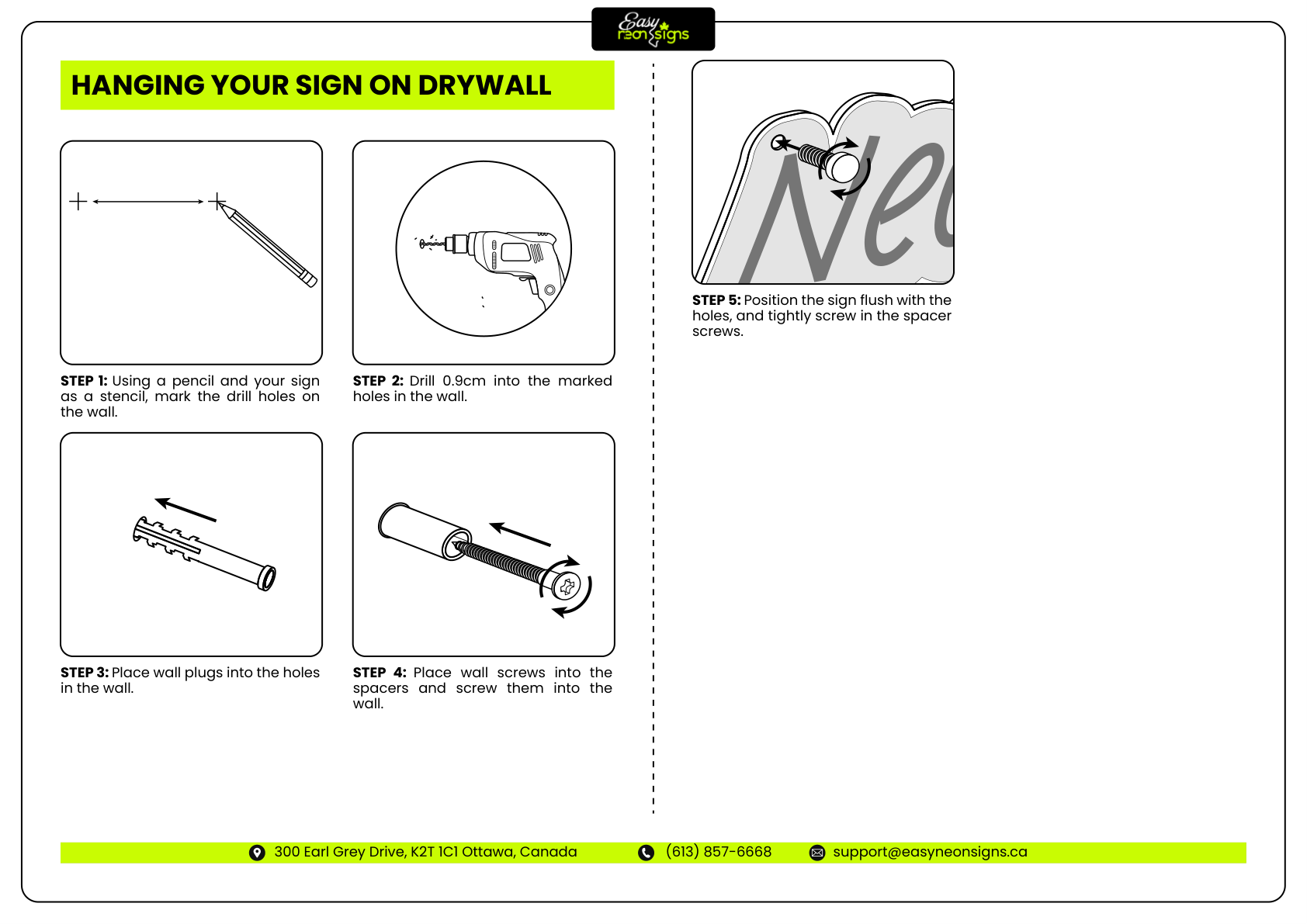
Wall mounting with spacers
- 01
Hold the acrylic backing in position with help if needed. Use a level, then mark the existing mounting holes. Check for hidden wiring or pipes before drilling.
- 02
Set the sign aside. Drill and fit anchors using the size and depth specified for your fixings and wall type. Do not rely on a universal drill size.
- 03
Fix the spacer bases securely to the wall. Align the sign’s existing holes with the spacers.
- 04
Fit the spacer caps and tighten carefully by hand until secure. Do not overtighten against the acrylic. Check that every fixing supports the sign before letting go.
See the wall-spacer diagram
03 / BRING IT TO LIFE
Connect the power.
For the plug-in sign shown in the manual, follow the cable from the sign back to the outlet.
- 01
Keep the power supply unplugged while connecting or disconnecting any of the sign’s cables.
- 02
Connect the sign’s low-voltage cable to the output of its matching dimmer/controller, if supplied. Connect the controller to the supplied power adapter. Use the connectors and orientation provided for your order.
- 03
Check that the connections are secure, the cables are not pinched and the power supply has ventilation. Use only the matching power equipment supplied or approved for your sign.
- 04
Plug the power supply into the outlet. Turn on any inline switch, then use the matching remote to turn the sign on and adjust its brightness.
See the original connection diagram
04 / FIND YOUR FAVOURITE SETTING
Meet your remote.
Match the remote in your hand to one below. You only need the instructions for your model.
Choose a remote above to see its controls. Yours looks different? Send us a photo
05 / LET’S WORK IT OUT
Something not quite right?
Start with the issue that matches what you see. Disconnect the power before checking or changing any cable connections.
06 / KEEP THE GLOW GOING
A little care. A lot of glow.
Unplug before cleaning
Switch off and disconnect the power. Wipe gently with a soft, dry cloth. Do not spray cleaners directly onto the sign or its electrical components.
Keep it supported
Check the fixings and cable support from time to time. Keep the power lead free of tension, and keep the power supply uncovered and ventilated.
Moving your sign?
Disconnect it first, then lift it by the acrylic backing. Protect the tubing and connectors, and keep your packaging for transport or storage.
A REAL PERSON, A LITTLE GUIDANCE
We’re here for your sign.
Send your order number, a short description of the issue, and clear photos of your sign, remote, controller and power-supply label. A short video helps with intermittent problems.
Email support (613) 857-6668support@easyneonsigns.ca